
Download CleanCenter – clean junk files, free up disk space, speed up computer, optimize system performance, remove temporary files
Overview
Designed as a dedicated utility for Windows users, CleanCenter aims to streamline system maintenance by targeting the accumulation of unnecessary files that degrade performance over time. The application focuses on freeing up hard disk space and enhancing overall system responsiveness through the removal of junk files such as temporary data, cache entries, and log files. By identifying up to 60 distinct types of redundant files, CleanCenter enables users to reclaim valuable storage and improve computing efficiency with minimal effort.
The app is tailored for individuals and professionals seeking a reliable, automated solution to maintain optimal system health. Whether managing a personal computer or a work machine, CleanCenter offers a straightforward approach to digital decluttering. Its purpose is not limited to freeing space—it also contributes to smoother operation, faster boot times, and improved application performance. For users who prioritize system reliability and long-term usability, CleanCenter serves as a practical tool within the broader productivity ecosystem.
Developed by Miniwish Software, the application reflects a focused effort on utility-driven design. Although the developer did not provide additional technical details about their background or development philosophy, the app’s functionality aligns with the expectations of a modern system optimization tool. Real-world use cases include routine maintenance after software installations, post-update cleanup, and regular system tuning to prevent performance degradation.
Key Features & Functionality
- Comprehensive Junk File Detection – CleanCenter scans for up to 60 types of unnecessary files, including temporary files, browser caches, log files, and system debris. This broad detection range ensures that even obscure or less common file types are identified and eligible for removal.
- One-Touch Cleanup Process – With a simple three-click workflow, users can initiate a full system scan and proceed to delete identified files without navigating complex menus or configurations.
- Hard Disk Space Optimization – By eliminating redundant data, the app helps users recover significant storage capacity, allowing room for important documents, media, and software installations.
- Performance Enhancement – Removing cluttered files reduces system load, contributing to faster startup times, quicker application launches, and more responsive overall operation.
- Regular Updates – The application receives periodic updates to maintain compatibility with evolving file structures and new types of temporary data generated by modern software and operating systems.
For example, after installing a large application, users may notice a slowdown due to leftover installation files. CleanCenter can detect and remove these remnants, restoring system speed. Similarly, frequent web browsing generates cache files that accumulate over time; CleanCenter efficiently clears them, improving both privacy and performance.
Interface, UX & Performance
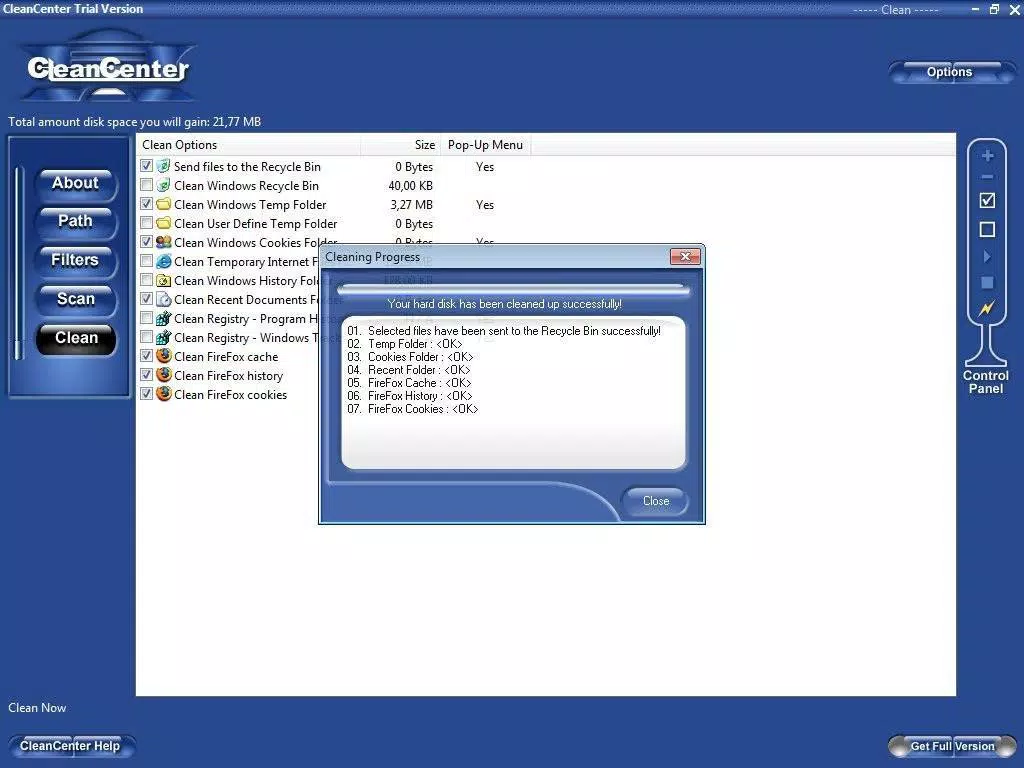
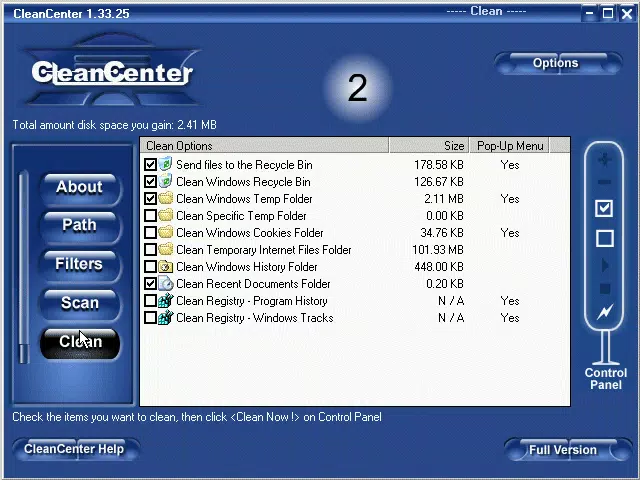
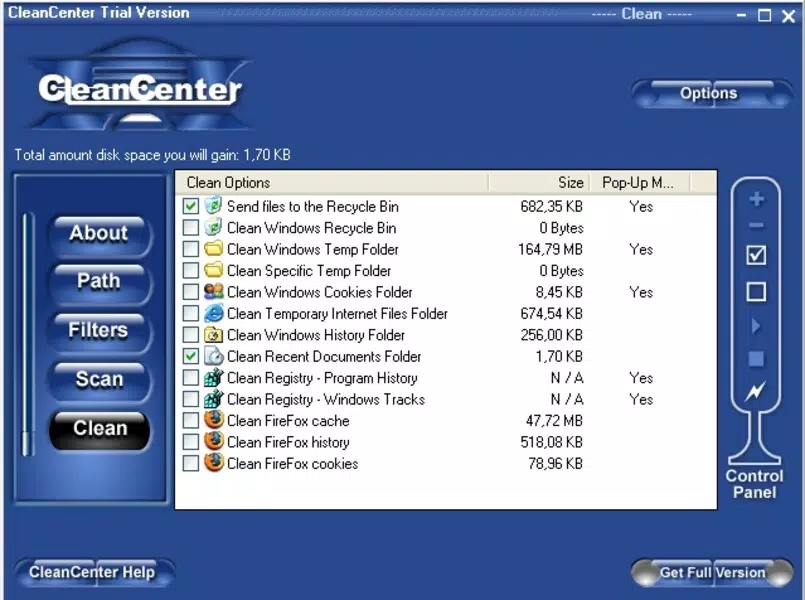
CleanCenter features a minimalist, user-centric interface designed to prioritize clarity and accessibility. The layout is organized around a central dashboard that displays scan results, estimated space recovery, and a single action button for deletion. Navigation is intuitive, with no hidden menus or complex settings, making it suitable for users with varying levels of technical expertise.
The visual style is clean and functional, relying on neutral colors and clear typography to reduce cognitive load. Buttons are clearly labeled, and progress indicators provide real-time feedback during scans and deletions. Responsiveness is consistent across different screen sizes and resolutions, though the developer did not list formal performance metrics.
Although the developer did not list formal performance metrics, the application operates efficiently without consuming excessive system resources during scans. Stability appears reliable, with no reported crashes or freezes in available documentation. The app maintains a lightweight footprint, consistent with its 15.2 MB file size, and integrates smoothly with the Windows environment.
Platform Compatibility & Technical Requirements
CleanCenter is available exclusively for the Windows platform. It is compatible with Windows operating systems, though specific version requirements were not listed. The application has a file size of 15.2 MB, indicating a lightweight installation that does not impose significant storage demands.
Users should ensure their system meets standard Windows requirements for running utility applications. However, the developer did not specify minimum OS versions, hardware specifications, or compatibility details beyond the platform. As such, compatibility information was not fully disclosed.
Pros and Cons
Pros
- Efficient detection of up to 60 types of junk files
- Simple, intuitive interface with minimal user input required
- Helps free up valuable hard disk space
- Contributes to faster system performance and responsiveness
- Regular updates ensure ongoing compatibility with new file types
Cons
- Specific OS version requirements were not disclosed
- No information on advanced customization options
- Price point of $14.99 may be considered high for a single utility tool
- Developer did not provide detailed privacy or data handling policies
- Compatibility with older or low-end Windows systems was not confirmed
FAQ
Is CleanCenter safe to use on my computer?
Yes, CleanCenter is designed to identify only non-essential files such as temporary and cache data. It does not remove system-critical files, and users can review the list before deletion.
Can I use CleanCenter on multiple Windows devices?
The licensing terms were not provided. Users should consult the official website or purchase page for details on multi-device usage.
How often should I run CleanCenter?
It is recommended to run the tool monthly or after major software installations to maintain optimal performance.
Does CleanCenter require an internet connection?
While the app does not require a constant connection, it may need internet access for updates to detect the latest junk file types.
Is CleanCenter available for macOS or Linux?
As of now, the application is only available for Windows. No versions for macOS or Linux were listed.
Final Thoughts
CleanCenter delivers a focused, effective solution for users seeking to reclaim disk space and enhance system performance on Windows. Its ability to detect a wide range of junk files and execute cleanups with minimal user effort makes it a valuable addition to any productivity toolkit. While the $14.99 price may deter some, the app’s reliability and regular updates justify the investment for those who prioritize system health.
For individuals managing busy workstations or personal computers that accumulate digital clutter, CleanCenter offers a practical and efficient maintenance tool. Its clean interface, lightweight design, and performance benefits position it as a strong contender in the system optimization space.
Download CleanCenter now


